Friday, 8 May 2015

Reflective Synopsis


Growing up in a tech world from a young age I didn’t know what to expect when I signed up to this course. Entering the classroom for the first time, embarrassingly late, and beginning the course work I thought this was going to be easy as pie. We began by accessing the iPads and carried out work on them for the remainder of the lesson. We looked at simple things such as opening settings, using the web browser and so on. My belief that this course would be ‘easy’ still stayed true. As the weeks went on, however, and the topics got more diverse my thinking drastically changed. We began looking at a numerous amounts of technologies that I’d never even heard of before. Ranging from digital tools for presentations, to programs that create mind-maps, and applications that allow you to create music, the list continued to grow with each week. My position in the digital world was challenged. And whilst being shaken I wasn’t deterred. Throughout the term, and during analysing each new technology, there were a few common aspects that acted as a platform for us to flaunt our new tools. These factors will be discussed shortly. Just like the technology itself I believe this experience has taught me the importance of continual learning, developing and sharing with others!

One of the most prominent aspects, and probably most important as a future teacher, we focussed on was safety features of the applications that we were discussing. Accessing these programs in a future classroom as a practicing teacher I need to ensure they are safe for students. They also need to be used in an ethical and legal manner. Making us focus on this same topic each week has almost engraved into our heads the importance of safe cyber world use. Intuitively it has also highlighted the major risks that could be involved. An example of this could be of a student using a program that’s online based. When using a digital technology like this we need to make sure we protect student identity, it is a safe learning environment, and who can access the information. On a lighter note these technologies also promote creativity.

During the process of analysing these programs a facet of learning I enjoyed most was creative thinking. From the most basic of digital technologies to far more complex ones almost all include an element of creativity. This term alone I used several in a matter of weeks. Ranging from iMovie to make movies obviously trailers and short films, to Wikispaces which allows you to design online spaces for several people to use at once, and even Didlr – a digital tool that lets you draw ‘didls’ (art with your fingers). I’ve grown to appreciate this course because not only has it kept me motivated but it’s allowed me (in some way or another) to do something I love. It’s allowed me to be artistic and creative, and question my choices which only makes me improve. Creating is also high on the Bloom’s Taxonomy which happens to be another continuing aspect of the term.

Throughout the term the Bloom’s Taxonomy scale was a continuing trend whilst analysing our new technologies. Bloom’s is a scale that is used to rank activities and programs as to what level of thinking they promote. This is usually classed as low level or higher order thinking. Thankfully digital technologies are all quite creatively driven – an aspect that ranks highly on the scale. This made for easy discussion. Due to the way I suggested use for the digital technologies most levels of the Bloom’s scale were in use. Whilst discussing Blooms the SAMR model was also evident.

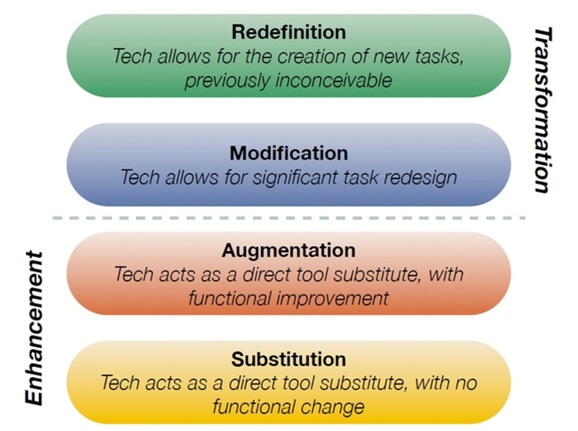
Of the duration of the course the SAMR model was probably the aspect that gave me the most grieve. The model encourages teachers to use technologies in ways that have previously not been done so before. It also promotes educators to further their own thinking… extend themselves. SAMR stands for Substitution; Augmentation; Modification; and Redefinition. With the latter two being the most difficult. Although this hasn’t been my most favourite aspect of the term I think it has been the one that’s taught me the most. And as well as extending my thinking it has also given me numerous ideas for when I have my own classroom. And hopefully many more to come!

I honestly can’t describe how much of a great adventure this whole thing has been. There’s been many great highs and some really bad lows but it’s all been worth it. This experience has taught me so much more than I ever thought I was capable of. I’m proud to say that I’ve almost finished the course and I’m so happy it’s been with the people sitting alongside me in class. Thank you so much Miriam I couldn’t have done it without you either. I can’t wait to continue learning more about the amazing new digital world!


Sunday, 26 April 2015

Reflection 5: Didlr

Ahhh, as the final week of weekly blogging arrives I can’t be happier! At long last I can enjoy my weekend without the stress of thinking about what to write. Although, the relief cannot yet be enjoyed as I still have this last hurdle to jump. This week we’ve been tasked with writing about a technology of our choice. Living in a world surrounded by technology I thought this would be an easy feat. Well, for anyone else it would but just like my life outside of university I struggle at making decisions. Days later I got there. My focus for this week would be on artistic programs. These will include Didlr and Microsoft Fresh Paint.

Didlr and Microsofts in-house art program are both applications with various capabilities that could be accessed in a visual art classroom. The programs allow users to design, edit, and export art all on their I.T. devices. Didlr is a more simplistic app that allows the user more export options that include printing your work onto mugs, canvas, and so on, While Fresh Paint provides more artistic options. These include various equipment options (choose between pens to paint, and even crayon!), various editing options and more. Didlr is quite a social program about sharing your Didls (your art) however it is still quite a safe app. Fresh paint on the other hand is quite the opposite and may be seen more school friendly. Both programs are also quite easy to access.

When it comes to explaining learning outcomes sadly… I’m not your expert. With some added assistance this week in class about the subjects let’s give it a whirl and see how we go! On your marks, get set… go! Both programs make students think creatively as they have to make something. After the creation phase comes reflection and as such students could look at the principles and elements of design. This promotes content recall. Lastly, students gain more experience with a new technology. And with that it’s safe to say we might need to rehash, for a second time, what a ‘learning outcome is’!

Now it’s time to move onto the SAMR model and how these programs reach all four standards. Looking firstly at Substitution. Instead of creating a physical artwork students could now do so via one of the programs. At an Augmentation level these applications provide the ability to edit and make changes easily without ruining their final designs. This makes them functionally easier to use than that of tradition methods. The next level of SAMR is Modification. For this level students could be asked to create an artwork on the programs. After that had been complete students would then have to recreate the same work on a physical material. And lastly, Redefinition. Students could be asked to participate in a class activity. This activity asks students to create a simple piece of art and export it to the next person using either of the programs. Each student must share to the next for a total of three times. Each time students make additions to the artwork which is then followed by a reflection task of how this has altered the feeling of the design.
This week saw me make use of only one of the programs mentioned in this post – Didlr. Below is a very simple and rushed example created by yours truly!


Sunday, 12 April 2015

Reflection 4: Presentations in the Classroom

The way students and teachers can present things to one another has dramatically altered over only a short period of time. This can be seen evident even while I was going through school. Whilst, you might say, this wasn’t that long ago I can certainly pinpoint many advancements in this area. In my own school our main presentation resource was the blackboard at the front of the class. I hated every screech and scratch that stupid chalk made to the surface. And… if we we’re lucky, an overhead projector might have been pulled out every once and a while. As the years progressed however and technology, primarily computers, made significant steps forward other possibilities began available. Programs such as PowerPoint used in conjunction with new high tech colour projectors changed the game forever. Since then more and more presentation methods have become accessible. Including online based program – Prezi.

Prezi allows the user to create a fun and interesting way to present any kind of information. The program can create a seemingly interactive based presentation for anyone to view. The user can create a Prezi by using a pre-customized layout or choose to be creative and design one of their own. It also allows you to add pictures and shapes, edit fonts and change sizes, and how it is to be viewed. You can work collaboratively together on a single Prezi however sadly it doesn’t allow for multi-authored posts. Depending on your subscription privacy levels vary. The most basic, and free, version allows for anyone to view your Prezi. This program is quite guided and provides numerous assistance when needed. Prezi is an easy program to grasp for anyone!

Now, you might be asking “What learning outcomes can this possibly ‘present’ to students in the classroom?”. Well… not only does it get learners interacting with ICTs but it promotes creativity as they have to display and select specific design elements to their own choosing. It also allows students to become a part of something more than just their own classroom. The program allows the user to share their Prezi’s and view others from across the globe! And simultaneously while they use this program they are becoming proficient with another facet of technology in a world underpinned by tech.

This is a resource I would love for students to use in a classroom of my own. It is only fair then that I know how to use the program myself. Click here to access a very simple Prezi that I created for the purpose of this blog post. It shows just how easy yet effective the online based application can work!

Sunday, 5 April 2015

Reflection 3: Videos in the Classroom


Videos are another form of technology that can be useful in a classroom setting. They provide a platform to cater for various tasks and can be used for varying genres. Film could be used in an informative task such as an assessment piece or alternately for a fictional piece like a short film. The possibilities are endless! So too are their capabilities. With numerous different programs to create videos available their abilities vary slightly. Most, however, simply provide the user an interface to make their own videos. Users can add audio, pictures, and film and customize with effects. Whilst the platform doesn’t allow for multi-authored publication students could work in small groups to achieve the same effect. Creating a video is quite simple and doesn’t require much experience.
When putting technology into action in the classroom it important to consider its effects; its learning outcomes. Is this technology going to impact my classroom in an effective and positive way? Incorporating videos into a classroom could be highly successful. It provides students the ability to work with peers, enhance their ICT skills, as well as allow them to be creative!

The use of videos in a school context could be integrated at various levels in relation to the SAMR model. At the first stage, Substitution, students called film themselves ahead of time for a class presentation. This would be an alternative to the traditional speech in front of their peers. Next comes the Augmentation stage. This step in a hospitality class, for example, could be executed by getting students to create a short video featuring pictures of their food overlayed with audio. At the Modification level students could work in pairs and film each other preparing a dish. They then would edit, and add further features to their videos. And finally at the Redefinition stage students could film and create a movie of the whole process. Students could create lists of Mis En Place (within their films), film how to create the dish and how to present it, and finally as people to critique and rate their meal. Through the different levels of the SAMR model many, if not all levels of Blooms taxonomy are also being used! From simply having general knowledge and understanding of how to make videos to creating them!
In high-school one of my classes was Film and Television so I am familiar with using videos and their programs. Due to time constraints, however, the video I have as an example isn’t mind-blowing… maybe a little mind-numbing perhaps?! Below is a very short clip of how I have explored the platform. In this example I used Apples in-house video editing program iMovie.

Saturday, 28 March 2015

Reflection 2: Blogs in the Classroom


With the progression of technology’s prevalence in classrooms the ways we can use it has also progressed. Computers and the internet have drastically impacted how we can teach and the ways we do so. This includes using blogs within a school context. Blogs are an online space that allow users to post any kind of information. Once the post is uploaded anyone can then view and comment on the blog. The user can change layouts, vary fonts, and modify the style of their blogs. The application can support multi-authored blogs, also called ‘team blogs’, and provide the option to turn on private view. Put simply this means the creator invites people to view their posts. The application itself is quite easy to grasp; if you can use the internet you can create a blog!
In a classroom context blogs can support a variety of different tasks and activities. They provide students the chance to work in groups, reflect and make constructive feedback on others work and the ability to access their information from anywhere! Blogs would also be a useful support tool for assessment. They act as an online drafting service almost. Teachers can comment on their assessable items and also allow for peer feedback.
 
In a classroom of my own blogs would be an inclusion that could be successfully integrated at many levels of thinking. Let’s use the SAMR model as an example of the different levels of integration. At the most basic level a blog could be used, or ‘substituted’, as a means to replace a traditional pen and paper activity. Taking this further the next step of integration requires ‘augmentation’. An example of this stage could be students incorporating images and embedded links to external websites. This makes it functionally more accessible than a bibliography for example. In the next step students could be asked to share and conference with other students in their class. This step, ‘modification’, makes for slight task redesign as it could be conducted as a homework activity. In the final stage of the SAMR model, ‘redefinition’, learners could be asked to complete a task with worldly proportions. Students could be tasked to participate in an activity that sees them working with other classes from around the globe. They must share their own information and access others to come up with a final assessment. It’s also highly relevant to add the further you go up the SAMR model stages the more high order thinking you encourage in relation to Blooms Taxonomy.
Setting students the task of completing an activity using technology is well enough but has to be supported by your own understanding and skill level with the resource. In this post alone I have been able to incorporate an image as well as a link to an external website. While this isn’t much it does show a sound level of skills with the application. I do wish to continue learning about the resource and its capabilities!

Sunday, 22 March 2015

Reflection 1: Wikispaces Activity


As the variety and capabilities of digital technology continues to grow so should it’s presence in the classroom. Having only recently finished schooling myself I know the evolving involvement of these technologies first hand. However it’s safe to say that these technologies may not have been used to their fullest. This course, Digital Pedagogies in Secondary Schools, has already opened my eyes to a great number of emerging new platforms that could be used in the classroom. One being Wikispaces.
Wikispaces is a free online program in which users can post or upload information. It allows users to share, add, and edit others said material. This makes the platform quite communal and accessible for group tasks in a classroom setting. Using the program for the first time, in a small activity about mobile phones using de Bono’s Thinking Hats, I found it easy to use and simple. Functionality wise the program could be easily utilized in schools as a learning resource. The activity also promoted high order thinking; breaking down the topic into different sub points to discuss.
This online activity also provided me the chance to analyse the programs possible learning outcomes. It could be argued, according to the SAMR model (which stands for Substitution; Augmentation; Modification; and Redefinition of technologies), that Wikispaces has redefined one facet of the way we can teach. Instead of face to face group work and sharing afterwards students can now do the same online. The program also means that students can share and edit work from all around the globe. Something previously impossible with previous incarnations of the group work and sharing with peers activity.
Partaking in the wiki activity under the structure of de Bono’s Thinking Hats I found quite useful. Being able to view other people’s posts and seeing what they had to say about the topic sparked ideas of my own. Putting this in a classroom would probably do the same. The activity also made me stay on track. Breaking questions into the various hats made me focus and also provided and easy structure to follow. This sort of activity in a high school class could be quite beneficial for the learning and sharing of ideas between peers. Wikispaces is definitely something I’ll be incorporating into classrooms of my own!